
SignalNote, anywhere
Open it in one window on PC/Mac, or one home screen icon on your phone. No installer needed — it installs from the browser in seconds.
If the install button doesn't respond, follow the steps below.Desktop app only
3 charts at onceShow BTC, ETH and SOL perpetual charts side by side on one screen, and press 1, 2 or 3 to enlarge one.
Ask SignalNote AIAsk things like "Why did you enter?" or "What's my P&L this month?" and get answers straight from the engine's numbers.
Desktop alerts for new signalsEven when the window is minimized, you get Windows/Mac notifications and a taskbar badge whenever an entry or exit happens.
Shortcuts & quick navigationPress Ctrl+K to jump to any screen, and / to ask SignalNote AI.
Always-on status barTotal assets, per-coin positions and run status stay pinned on the left, so there's no need to switch tabs.
Separate from browser tabsOpens in its own window so it never gets buried among tabs, and can sit on a separate monitor.
Windows
PC app- Open this site in Chrome or Edge.
- Click the install icon on the right side of the address bar (monitor with an arrow).
- Clicking Install adds it to the Start menu and taskbar.
macOS
Mac app- Chrome or Edge: click the install icon in the address bar → Install.
- Safari (macOS Sonoma or later): File menu → Add to Dock.
- Open it directly from Launchpad or the Dock.
iPhone · iPad
Mobile app- Open this site in Safari.
- Tap the Share button at the bottom (square with an upward arrow).
- Add to Home Screen → tap Add.
Android
Mobile app- Open this site in Chrome.
- Top-right ⋮ menu → Install app (or Add to Home screen).
- Clicking Install adds it to the app drawer.
App Store
Official App Store · Google Play apps are coming soon. For now, the app installed using the method above provides all the same features.
App Store · Coming soon
Google Play · Coming soon
Chrome extension
Signal Remix AI Chart Copilot — chat with SignalNote AI right next to your TradingView chart and check engine signals and their rationale instantly.
Get the extension (zip)Chrome extensions have no installer (.exe). Load the extracted folder into Chrome to install. Follow the 4 steps below.
See install steps with pictures ↓
The Chrome Web Store listing is under review. Once approved, you can install it with one click.
How to install the Chrome extension
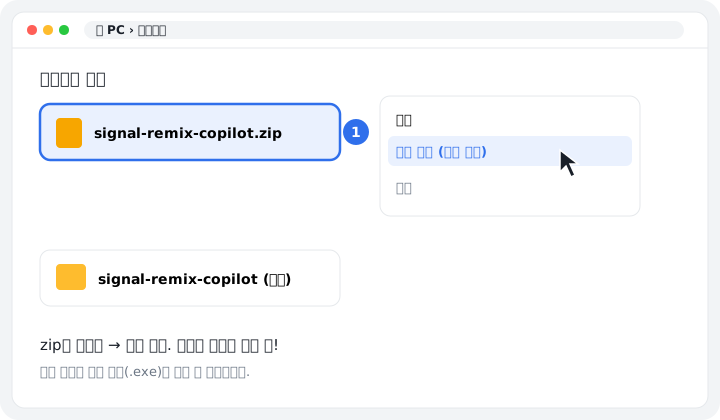
Right-click the downloaded zip file → Extract All.
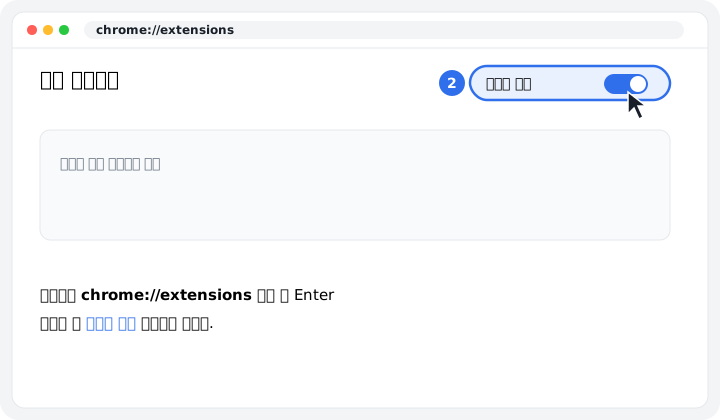
Enter chrome://extensions in the Chrome address bar and turn on Developer mode in the top right.
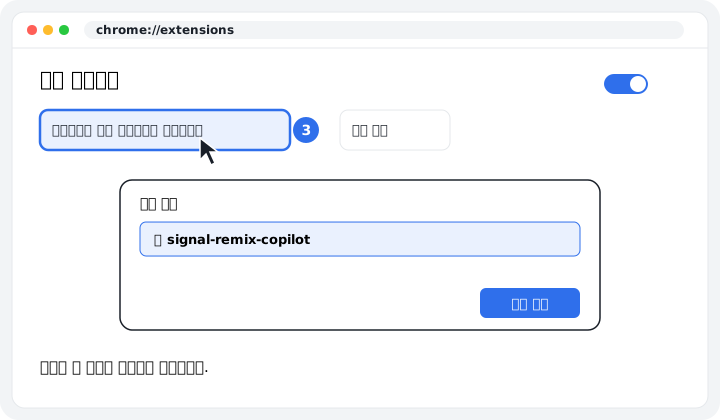
Click Load unpacked → select the unzipped folder.
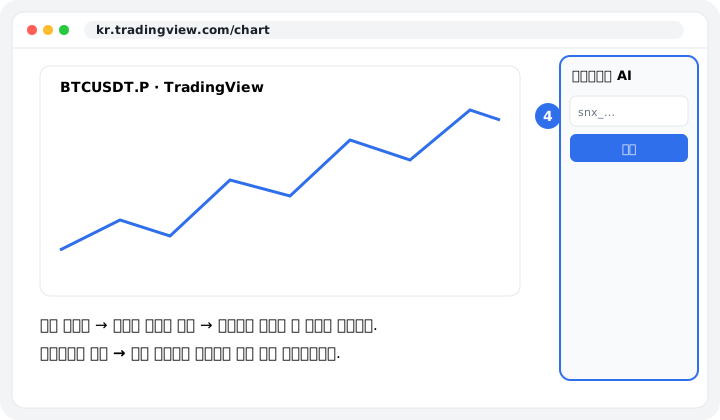
Pin the extension from the puzzle icon, then paste the connection key you created in SignalNote settings into the panel.